Lovegobuy
 How to order with Lovegobuy: a first purchase guide
From a Spreadsheet product link to your doorstep: what to check at each stage.
Before you begin
A Lovegobuy Spreadsheet helps you find listings; Lovegobuy handles the purchase and parcel. Have your delivery country, a size reference and a budget that includes shipping ready. The screens below come from an archived official tutorial captured on 16 June 2026. They explain the sequence, not today’s prices or button positions.
Review the costs and the agent’s role before your first payment.
1. Find the product and keep its link
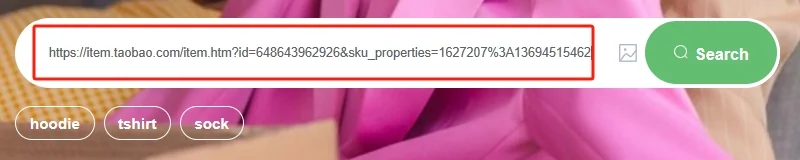
Search this Spreadsheet by product name, or browse a category. Open the product, compare its photos and description, and retain the original marketplace URL. If you only have a picture, use the photo-search route. A translated name is useful for discovery but does not identify one exact listing.
2. Check the seller and choose a variant
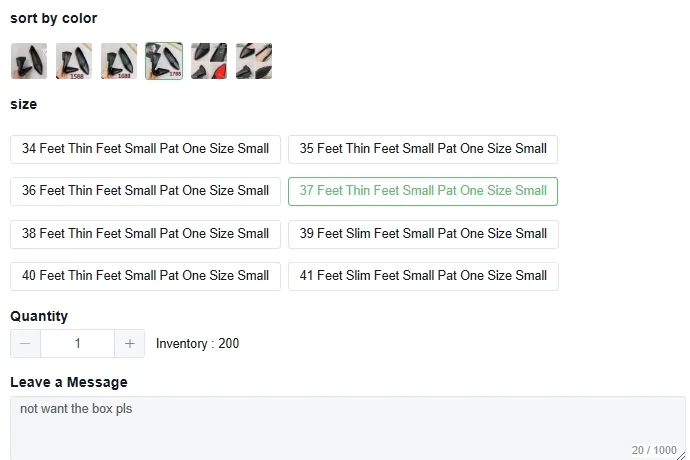
Read the seller checks, compare the product measurements with an item you own, and select colour, size and quantity. Photos may show several versions while the displayed price belongs to only one. Do not treat an automatic size translation as a fit guarantee.
3. Review the order and pay for the items
Confirm the listing, selected variant, domestic delivery charge and any message before payment. Save the order reference and monitor the order in your Lovegobuy account. Item payment does not mean international shipping is already paid.
Use the confirmation row as your comparison reference.
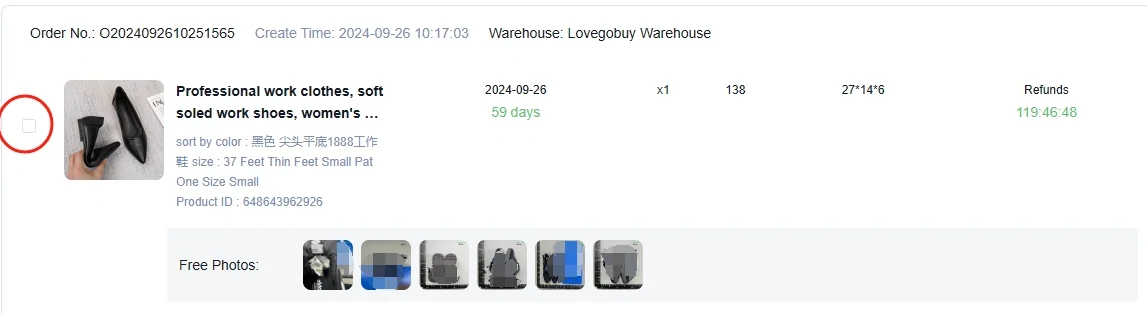
The tutorial example below carries a translated title, a selected shoe option, a quantity and a buyer note in one row. Those fields matter more than recognising the photograph. Save the original seller link and selected option text with the order so a later warehouse comparison has a precise reference.
For example, if the received colour looks different, first check whether the order selected a different variant or whether lighting is making the same colour difficult to judge. Ask for a specific view if the image is inconclusive. If the label differs from the option you authorised, describe that exact mismatch and attach both records.
A note such as “remove the box” is a separate packing preference. It should not stand in for the size or colour selection, and you should reconsider it before the return question is resolved. Keep packaging or tags needed for an eligible return until you have chosen the next action.

4. Wait for the seller and review warehouse QC
The seller sends the purchase to Lovegobuy’s warehouse. When photos are available, compare colour, size label, model, quantity and visible condition with your saved listing. Ask for a close-up or measurement if a detail is unclear; inspect the current return deadline before accepting the item.
QC photos show visible condition. They cannot establish authenticity, comfort or long-term durability. Read the QC inspection checklist.
5. Choose a parcel and shipping service
Select the items you want sent together. Check destination restrictions, allowed product types, parcel weight and dimensions, tracking, and any cover offered by the shipping line. A larger combined box is not automatically cheaper: the billed weight may depend on its dimensions.
Use the current shipping estimate and the final parcel quote. Read the line’s terms before selecting it and follow the applicable declaration instructions. Shipping and parcel guidance explains the decisions.
6. Pay shipping and track the parcel
Confirm your delivery address and final shipping total. After dispatch, save the tracking number and follow updates in your account. If the parcel or order needs attention, contact Lovegobuy with the order or parcel reference through its own support route.